Most paid search accounts are optimizing for the wrong thing, and most marketers do not realize it until sales starts complaining about lead quality. A campaign can hit a low cost per lead and still send the sales team a pile of names that never buy. This is where connecting CRM data to google ads campaigns changes the picture entirely. At PROHED, a Google Ads agency working across D2C, EdTech, FinTech, and B2B accounts, we usually recommend this CRM-to-ads connection as the first fix when lead quality becomes a concern.
What Does Connecting CRM Data to Google Ads Actually Mean?
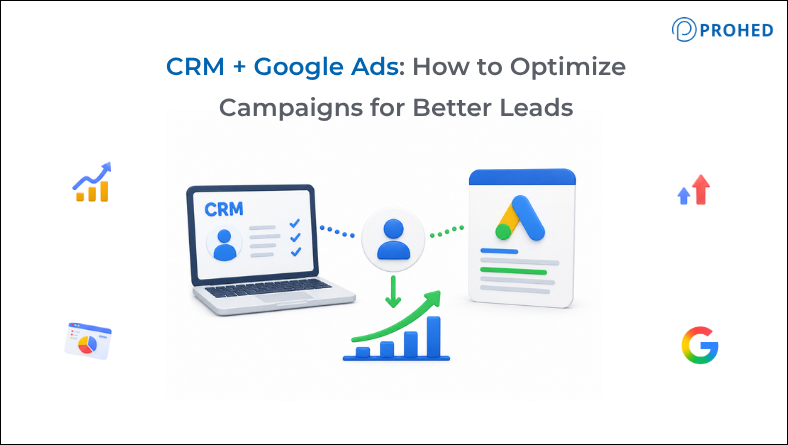
By default, the platform only sees what happens on your website: a form fill, a call click, a chat started. It has no idea whether that lead turned into a real conversation, a qualified opportunity, or a closed deal, since that information lives inside your CRM, not on your landing page. Connecting the two means feeding CRM outcomes back into your bidding system so it learns from real results instead of guessing.
You generally achieve this through offline conversion imports. Your system captures a unique click identifier, usually the GCLID, the moment someone fills out a form and stores it alongside the lead record in your CRM. Once your team qualifies or closes that lead, you upload the outcome back using that same identifier. Over time, this teaches the algorithm which clicks are worth chasing and which ones only look good on a dashboard.
Why the Platform Alone Can’t Judge Lead Quality
Smart Bidding optimizes for whatever you tell it to optimize for, nothing more. If the only signal available is form submissions, the system will happily find more people willing to fill out a form, regardless of whether they fit your ideal customer profile. That is not a flaw in the campaigns themselves; it is simply the system doing exactly what it was asked to do.
Consequently, cost per lead can look excellent while sales conversations stay flat. A form fill from a genuine buyer and one from someone browsing out of curiosity look identical unless CRM data tells the system otherwise. This gap is exactly why understanding how to improve Google Ads lead quality with CRM data has become one of the more common questions among teams running paid search for B2B and high-consideration products.
How CRM Data Improves Lead Quality
CRM Signal | What It Tells Google Ads |
Qualified lead status | Which form fills turned into real conversations |
Deal value at close | Which clicks are worth more, enabling value-based bidding |
Lost or disqualified reason | Which sources produce unqualified traffic |
Sales cycle stage reached | How far a lead progressed, not just whether it converted |
Repeat or referral customers | Which campaigns drive long-term value, not one-time conversions |
Steps to Optimize Campaigns With CRM Data
A few practical steps make this connection work well:
- Capture the GCLID at the point of form submission and store it against the lead record.
- Define clear conversion stages, such as qualified lead, opportunity created, and closed-won, rather than vague labels.
- Upload offline conversions consistently, ideally daily, so Smart Bidding has fresh data to learn from.
- Start with qualified lead as the optimization signal before moving toward closed-won, since bidding systems need enough volume to learn.
- Move toward value-based bidding once deal values are flowing in reliably, so campaigns optimize toward revenue rather than lead count.
- Review CRM and platform numbers side by side regularly, since mismatched totals usually point to tracking issues.
Optimization Checklist Before You Scale Spend
- Is the GCLID being captured on every form across every landing page?
- Are conversion action names consistent between the CRM and Google Ads?
- Is at least one to two conversion cycles of data available before conversions are used for bidding?
- Are deal values being updated when a sale changes after close?
- Is someone reviewing CRM versus Google Ads totals on a monthly basis?
Related Read: Google Ads Introduces New Changes to Target-Based Smart Bidding
Common Mistakes to Avoid
A few missteps show up repeatedly across campaigns trying to use CRM data:
- Switching straight to closed-won as the bidding signal before enough volume exists to support it.
- Uploading conversions irregularly, which leaves gaps that confuse the bidding algorithm.
- Using generic conversion names that make it hard to tell what each imported action represents.
- Ignoring lost or disqualified reasons, which hide patterns that could improve targeting.
- Treating this as a one-time setup instead of an ongoing part of campaign management.
Where PROHED Fits Into This
As a google ads agency offering full google ads support, PROHED builds this CRM connection into campaign management from day one rather than treating it as an afterthought. This applies across lead generation accounts, alongside the broader digital marketing services the team runs, including SEO and social media management.
Getting google ads for digital marketing right increasingly depends on data quality, not just creative or bid strategy. Whether a brand needs help setting up offline conversion tracking or wants to optimize campaigns already running, having a team that understands both the ads platform and CRM workflows tends to produce cleaner results than either working alone.
Conclusion
Connecting CRM data to Google Ads is not a one-time technical task; it is an ongoing habit that keeps bidding systems working toward the right goal. Once qualified leads, deal values, and lost reasons start flowing back into the platform, campaigns naturally shift away from cheap form fills and toward the leads sales teams actually want. That shift tends to matter more for long-term results than any single bid adjustment ever could.
FAQs
1. What is an offline conversion import?
It is the process of uploading real outcomes from your CRM, such as qualified leads or closed deals, back into the ad platform using a stored click identifier. This lets Smart Bidding learn from what actually happened after the click, not just the form submission.
2. How long does it take to see results after connecting CRM data?
Most accounts need at least one to two full conversion cycles of consistent data before bidding systems learn meaningfully from it. Rushing this step, especially by switching straight to closed-won too early, often does more harm than good.
3. Do I need a developer to set up CRM integration?
Basic GCLID capture and manual uploads can often be handled without heavy development work, especially with built-in tools. That said, larger accounts usually benefit from a proper integration through the API or a CRM connector for reliability.
4. What’s the difference between qualified leads and converted leads?
A qualified lead marks that a form fill was reviewed and found genuinely promising, while a converted lead marks that it reached a defined closing step. Many accounts start by optimizing toward qualified leads before moving to converted leads once volume supports it.
5. Can small businesses benefit from this kind of integration too?
Yes, though volume matters more here than for larger accounts. If lead volume is low, a mid-funnel signal like qualified lead usually works better for bidding than waiting on rare, direct sales.
6. Will this integration slow down my current campaigns?
Not if you set it up carefully. Your existing campaigns keep running as usual while you add and monitor offline conversions, and you phase in bidding changes gradually once the data proves reliable.
Ready to Turn Leads Into Real Revenue?
Cheap leads that never close are not a win, no matter what the cost-per-lead metric shows. PROHED, a leading digital marketing agency in Gurugram, delivers performance marketing services across paid search, SEO, and social media, ranking among the top digital marketing companies in India.
Schedule a Free Strategy Call with PROHED Today