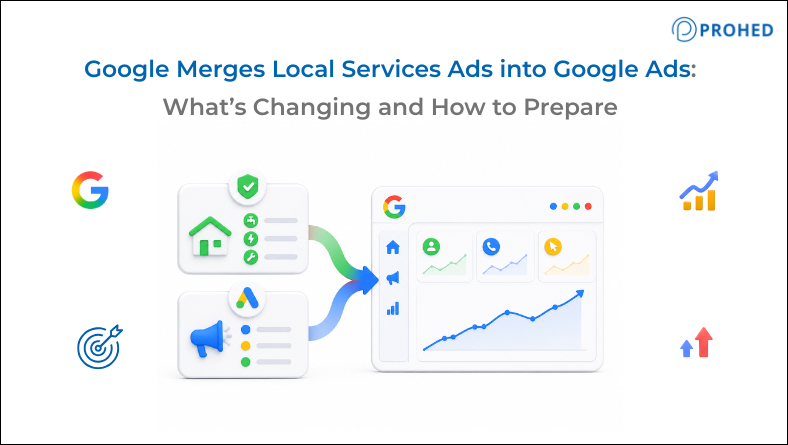
Local Services Ads place verified providers at the top of Google searches with a Google Guaranteed or Screened badge. Starting in August 2026, Google is moving these campaigns into the main Google Ads interface as Performance Max pay-per-lead campaigns. While you still pay per lead, budget controls, bidding, and reporting are changing drastically. At Prohed, a performance marketing agency in Gurgaon, we’re reviewing client accounts ahead of this migration because the details matter more than the headline suggests.
Google has a pattern of consolidating things. RSAs replaced ETAs. Smart campaigns absorbed standard campaigns for certain account types. Performance Max arrived and absorbed Shopping. Now, Local Services Ads are next.
From August 2026, Google begins migrating google local services ads accounts into Google Ads as a new Performance Max campaign type built around pay-per-lead objectives. The rollout starts with a small group of US advertisers across home services, pet care, wellness, and education. It expands through the rest of 2026 for more US advertisers, and then reaches non-US accounts through 2027.
The migration happens automatically. Account admins receive a 14-day notice, then a 7-day reminder, then a confirmation when it’s done.
That timeline sounds manageable. However, several things change in ways that need attention before the migration happens, not after.
What Is Actually Changing
Most coverage of this update has focused on the interface change. The more important story is the operational and strategic changes underneath it.
Here’s a clear breakdown of what’s different after migration:
- Budget structure changes from weekly to daily: Current local services ads by google use a weekly average budget. After migration, advertisers manage a daily budget. This is a straightforward change, but accounts need to recalculate accordingly. A weekly budget of ₹70,000 doesn’t automatically translate to ₹10,000 per day in the way the math suggests, because the weekly model allowed more flexibility in how spend distributed across days.
- Manual bidding is being removed: Some advertisers currently set a maximum cost per lead through manual bidding. After migration, manual bidding will no longer be supported. Campaigns will run on Target CPA bidding, with Google managing lead acquisition toward that target automatically.
- Vertical-level Target CPA is being deprecated: This is the change that deserves the most attention. Currently, advertisers running multiple service categories can set different Target CPA values for each category. A plumber can target ₹800 per lead for emergency repairs and ₹1,500 per lead for boiler installations, because those leads have very different close rates and customer values.
- After migration, Google calculates a single campaign-level Target CPA across all service categories. Both lead types are blended into one target.
- The dashboard and historical reports don’t transfer: The existing local services ads dashboard will be shut down after migration. Lead histories transfer to the new Lead Manager inside Google Ads. Historical performance reports do not transfer. Once the migration completes, access to the old dashboard ends.
- BBB callouts are being removed: Google no longer supports Better Business Bureau callouts after migration. Advertisers should prepare at least six alternative callout options before the account moves.
Why the Unified Target CPA Is the Biggest Strategic Risk
The switch to a unified Target CPA needs far more discussion than it’s getting.
Service businesses routinely handle lead types with fundamentally different economics:
- Legal firms balancing family law vs. personal injury
- Home services taking basic maintenance calls vs. full HVAC installations
- Healthcare providers handling routine checkups vs. high-value consultations
These categories have completely different close rates and profit margins. Under the old system, setting separate CPA targets prevented cheap, high-volume leads from cannibalizing budget meant for high-value categories.
With a unified Target CPA, Google blends everything into a single average. The algorithm then optimizes for total lead quantity, ignoring the distinct value of each service line. The result? You risk overspending on low-value leads and underspending on your most profitable ones.
How to handle the shift:
- Split your campaigns: Google suggests creating separate campaigns for vastly different service lines. The catch: Splitting campaigns dilutes conversion data, which can weaken bidding signals if your lead volume is low.
- Audit your data now: Pull category-level lead data to compare close rates and total customer value. Use those metrics to decide whether a single blended campaign or multiple split campaigns makes financial sense for your volume.
The Data Loss Problem Nobody Is Talking About Enough
Here’s what deserves more attention than it’s getting.
Historical reports do not transfer to Google Ads after migration. The old dashboard closes. Any performance data sitting in the current local services ads interface becomes inaccessible once the account moves.
This matters in several specific ways:
- Year-over-year reporting becomes harder: Comparing post-migration performance to pre-migration baselines requires data that needs to be exported before the account migrates. If this isn’t done before the 14-day notice window ends, that historical context is gone.
- Client reporting for agencies gets disrupted: For google ads agency teams managing multiple service business accounts, each account migrates independently on its own timeline through 2027. Agencies managing several accounts need to build a systematic process for downloading reports across all accounts before each individual migration date rather than waiting until a single deadline.
- Attribution continuity breaks: Any analysis comparing google ads for business performance before and after the migration needs pre-migration data to be available. Campaign-level performance, lead volume by category, average cost per lead by service type: all of these need to be in an external location before the dashboard closes.
Download historical reports now, even if the migration isn’t imminent for a specific account. The cost of doing this is minimal. The cost of not doing it after the fact is permanent.
What Changes in the Lead Management Workflow
The existing local services ads inbox is being replaced by a Lead Manager within Google Ads. This is a workflow change that affects whoever in the business handles lead follow-up, not just the person managing the ad account.
Practically, this means anyone accessing the lead inbox needs access to the Google Ads account after migration. For businesses where the person managing leads is different from the person managing ads, permissions need to be reviewed and set up correctly before migration.
Additionally, the speed of lead response matters significantly for service businesses. A lead generated through local services ads by google has a shorter consideration window than a form fill from a long-form landing page. The Lead Manager in Google Ads needs to be set up and monitored with the same urgency as the existing inbox, not treated as a new feature to figure out after migration.
Related Read: The AI Overview Effect on CTR in Google Ads: Why More Impressions Now Means Less Revenue
The PROHED Local Services Migration Readiness Checklist
At PROHED, we use a structured approach to prepare client accounts before changes like this take effect. For the local services ads migration, the readiness checklist covers five areas:
- Export all historical reports before migration: Segment by service category, time period, and lead type. Store externally in a format that supports year-over-year comparison.
- Audit service category economics: Pull close rate, average job value, and cost per lead data for each category. Decide whether a single campaign or separate campaigns better serves the account’s volume and economics.
- Calculate the right daily budget: Convert from weekly to daily budget logic deliberately rather than accepting any automatic conversion. Consider seasonal patterns and weekly spend distribution when setting the new daily figure.
- Prepare callout alternatives: With BBB callouts being removed, prepare at least six strong alternative callouts covering key trust signals: licences, guarantees, response time, service area, years in operation, and relevant certifications.
- Review Lead Manager access and workflows: Confirm that all team members who need access to leads have appropriate Google Ads permissions. Update any internal lead response processes to reflect the new inbox location.
What This Migration Signals About Google’s Direction
It’s worth stepping back for a moment to note the broader pattern here.
Google merges Local Services Ads into Google Ads at a time when it’s also consolidating Dynamic Search Ads into AI Max and expanding Performance Max’s reach across more campaign objectives. The direction is consistent: fewer separate surfaces, more unified management, more algorithmic control, and less granular manual control for advertisers.
This is both an efficiency gain and a control loss, depending on how an account is managed. Advertisers who were using manual bidding, category-level CPA targets, and a separate dashboard as deliberate strategic tools will feel the change more than those who were running the campaigns with minimal customization.
It also reinforces a wider point about google ads management services in 2026: as Google consolidates campaign types and automates more bidding decisions, the work of a skilled google ads agency or digital marketing agencies in Gurugram increasingly sits in the strategy and governance layer, deciding how to structure campaigns, what to set as conversion targets, and how to interpret results, rather than in day-to-day bid management.
At Prohed, this is exactly where our google ads for business engagements are focused. Beyond the LSA migration specifically, our broader work in Performance Marketing, B2B Lead Generation, B2C Lead Generation, Search Engine Marketing, and SEO is built around treating platform changes as strategic decisions rather than technical updates to accept passively.
As a performance marketing agency in Gurgaon and an established ad agency in Gurgaon, PROHED prepares client accounts ahead of migrations like this one because the decisions made before the change takes effect consistently produce better outcomes than the ones made afterward under time pressure.
Conclusion
Google’s Local Services Ads migration into Google Ads is automatic and the timeline is fixed. However, the decisions that determine how well an account performs after migration are not automatic, and they need to be made before the 14-day notice window arrives.
The unified Target CPA change affects multi-service advertisers most directly and deserves a category-level economic analysis before migration. Historical data needs to be downloaded before dashboard access ends permanently. Budget calculations need to be converted deliberately. Lead workflows need to be updated to reflect the new interface.
Advertisers who prepare properly before their migration date will have the data, campaign structure, and workflow readiness to evaluate post-migration performance accurately and optimise from a strong starting position. Those who treat the migration as a notification to acknowledge rather than a change to prepare for will spend the weeks after migration recovering ground that didn’t need to be lost.
Frequently Asked Questions
1. What are Local Services Ads and how are they changing?
Local Services Ads are pay-per-lead ads for service businesses that show verified providers with a Google Guaranteed or Screened badge at the top of search results. Starting in August 2026, Google will migrate them into Google Ads as Performance Max pay-per-lead campaigns. Billing remains pay-per-lead, but bidding, budgets, reporting and lead management are all different.
2. When does the migration from Local Services Ads to Google Ads happen?
Google will start migrating a small number of US advertisers August 2026 for home services, pet care, wellness, and education advertisers. This will roll out to additional US advertisers later in 2026 and then to non-US advertisers through 2027. The migration deadline is 14 days after an account admin is notified to migrate their specific account.
3. Will the pay-per-lead billing model change after migration?
No. Advertisers will continue paying for valid leads including calls, messages, and bookings, rather than clicks. The billing model remains pay-per-lead after migration, even though the campaigns will appear as Performance Max within Google Ads.
4. What happens to the unified Target CPA if I advertise multiple service categories?
Google will calculate one campaign-level Target CPA across all service categories after migration. Vertical-level or category-specific Target CPA settings will be deprecated. Advertisers with service categories that have meaningfully different lead economics may need to create separate campaigns to maintain bidding control, with the understanding that splitting campaigns reduces conversion data per campaign.
5. Will historical reports transfer to Google Ads after migration?
No. Historical performance reports do not transfer. Lead histories transfer to the new Lead Manager inside Google Ads, but dashboard access to historical reports ends once migration completes. Advertisers should export and store all historical reports before their account migrates.
6. What happens to manual bidding in the new Local Services campaigns?
Manual bidding will no longer be supported after migration. All campaigns will run on automated Target CPA bidding, with Google managing lead acquisition toward the set target. This removes the option to set a maximum cost per lead manually.
7. How does the Lead Manager in Google Ads differ from the current Local Services inbox?
The Lead Manager inside Google Ads replaces the existing Local Services Ads inbox for managing and responding to leads. Anyone who needs access to leads after migration will need appropriate Google Ads account permissions. Businesses should update their internal lead response workflows to reflect the new interface before migration.
8. What should advertisers do right now to prepare for the migration?
Five immediate actions: export all historical reports and store them externally, audit service category economics to decide on campaign structure, recalculate daily budget from the current weekly figure, prepare at least six alternative callouts to replace BBB callouts, and review Google Ads access permissions for anyone involved in lead management.
Is your Google Local Services Ads account ready for migration? Prohed can audit your current setup, review category economics, and prepare your campaigns before the transition begins.
Schedule a Free Strategy Call with PROHED Today