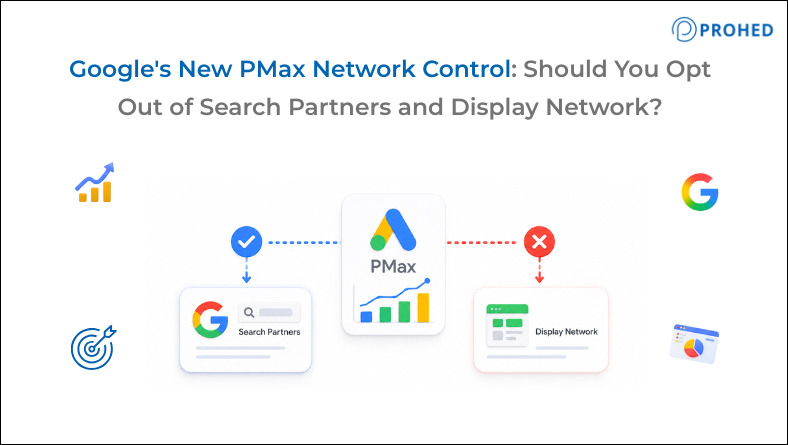
PMax network control refers to a new feature Google is testing that allows advertisers to exclude the Search Partner Network and Google Display Network from Performance Max campaigns through two simple checkboxes. Until now, both networks ran automatically inside every PMax campaign with no opt-out available. At PROHED, a performance marketing agency in Gurgaon, we’ve run this audit across client accounts and the pattern is consistent: most lead generation and direct response campaigns should opt out of at least one of these networks, and in many cases, both
For years, the most frustrating thing about google pmax wasn’t the automation. It was the forced inventory bundling.
Search Partners: opted in by default. Display Network: opted in by default. No way to turn either off, even when account data clearly showed those networks were driving click volume without contributing to conversions.
That’s changed. Google is now testing two checkboxes inside the PMax campaign console. One for Search Partners. One for Display. Both checked by default. Unchecking either one is now possible for accounts in the alpha group.
The feature is limited for now. However, the opt-out decision itself deserves more than a reflexive yes.
What Are These Two Networks Actually Doing?
Most coverage of this google pmax update assumes readers know what Search Partners and Display actually are. They’re not the same thing, and confusing them leads to the wrong decision.
- Search Partners are third-party websites that license Google’s search technology and show Google ads alongside their results. This includes directories, smaller search engines, parked domains, and niche portals. User intent here varies significantly from mainline Google Search. The same bid that wins a high-intent conversion on Google.com can produce an expensive, low-quality click on a Search Partner site.
- Google Display Network is a collection of millions of websites and apps where Google serves banner and responsive ads. Users encountering these ads are almost always in browsing mode, not actively searching. This makes Display a fundamentally different intent environment, regardless of how the campaign targeting is structured.
Here’s the clearest way to separate them:
Parameter | Search Partners | Google Display Network |
User intent | Search-based, variable quality | Browsing, low purchase intent |
Typical conversion rate vs Google Search | Lower | Significantly lower |
Opt-out in Search/Shopping campaigns | Always possible | Always possible |
Opt-out in PMax previously | Not available | Not available |
Opt-out in PMax now | Yes, alpha testing | Yes, alpha testing |
Unsure if Search Partners are draining your PMax ROI?
Schedule Your Google Ads Account Audit Call with PROHED Today
How to Audit What These Networks Are Delivering
Before deciding whether to opt out, look at what the data is actually showing. Here’s exactly how to do it.
1. For Standard Search or Shopping Campaigns
Go to your campaign view in Google Ads. Click Segment at the top of the data table. Select Network (with search partners). This splits performance into two rows: Google Search and Search Partners.
Look specifically at cost per conversion and conversion rate for each row. In most accounts, the gap is large enough to make the decision straightforward.
2. For Performance Max Campaigns
Open the Channel Performance report inside a PMax campaign. This shows a breakdown of spend and performance across Google Search, Search Partners, Display, YouTube, Gmail, and Discover.
If Search Partners or Display shows a cost per conversion two times or more above the campaign target, the case for opting out is clear.
3. Check the Content Suitability Report
In Google Ads, go to Insights and Reports and open the Content Suitability report. This shows the actual websites where your ads appeared on the Search Partner network.
Review the list carefully. For most accounts, a portion will be low-quality directories, spam domains, and websites completely unrelated to the campaign’s audience. Seeing the specific sites where budget was spent tends to make the opt-out decision considerably easier to justify, both internally and to clients.
Should You Opt Out? A Campaign-by-Campaign Answer
|
Campaign Type |
Search Partners |
Display Network |
Reason |
|
Lead generation with CPA target |
Opt out |
Opt out |
Both inflate volume without conversion quality |
|
E-commerce with ROAS target |
Test first |
Test first |
Display assists some conversion paths; check data first |
|
Brand awareness campaign |
Keep |
Keep |
Reach is the goal; lower-intent impressions are acceptable |
|
Low budget, limited conversion data |
Keep |
Keep |
Narrowing inventory disrupts algorithm learning |
|
Remarketing-heavy PMax |
Keep |
Keep |
Display is core to remarketing reach |
|
High budget, strong conversion volume |
Test |
Test |
Use a controlled experiment; algorithm can adapt |
The most consistent finding across top digital marketing companies in india and agency accounts is that lead generation campaigns benefit most from opting out of both networks. E-commerce accounts need a more careful look at assisted conversion data before making that call.
What to Do Before Opting Out
Don’t opt out immediately. These four steps produce better outcomes than a quick decision.
Step 1: Run the audit first: Pull the Channel Performance report and the Content Suitability report. Document cost per conversion by network before any change is made. This baseline is essential for evaluating what changes after the opt-out.
Step 2: Test one network at a time: Opt out of the lower-performing network first and monitor for 2 to 3 weeks before touching the second. This prevents simultaneous disruption to the algorithm’s learning across both networks and keeps the cause-and-effect relationship clear.
Step 3: Prepare leadership for a short-term volume dip: Opting out of either network can cause a temporary drop in total conversion volume while the algorithm adjusts, even if cost per conversion improves. Set that expectation before the change, not after the numbers move.
Step 4: If the campaign is in a learning phase, wait: The algorithm needs conversion data to optimise. Narrowing inventory during a learning phase compounds the data scarcity problem. Stabilise performance first, then evaluate network exclusions.
Related Read: Google’s AI Max vs. PMax: What’s Actually Different and Which Campaign Wins in 2026
Why Google Released This Now
This isn’t a goodwill gesture. It’s a competitive response.
ChatGPT launched advertising in February 2026 and has moved quickly since: adding conversion tracking, video formats, and geographic expansion into new markets. Meanwhile, Google’s search revenue growth rate cooled slightly in Q2 2026 compared to the same period in 2025.
Quietly resolving one of the most consistent advertiser complaints about google performance max makes strategic sense in that environment. This feature follows a series of other incremental control additions Google has made to PMax over the past year: campaign-level negative keywords, channel performance reporting, and first-party audience exclusions.
Each one has moved PMax incrementally away from the black-box model it launched with. The pmax network control opt-out is the most significant addition yet because it affects where money is spent at the inventory level, not just how it’s targeted or reported within a network.
For performance marketing agency in India teams managing large PMax budgets, this represents a meaningful shift. The strategic value in managing PMax is increasingly in governance decisions like this one, choosing inventory, setting conversion event hierarchies, and deciding Target CPA by campaign tier, not in day-to-day bid management the algorithm already handles.
Among marketing agencies in india, the teams building structured audit and opt-out processes now will have cleaner performance data and stronger client conversations when this feature rolls out broadly.
At PROHED, pmax control decisions connect directly to our broader Performance Marketing, E-commerce Marketing, B2C Lead Generation, and B2B Lead Generation work because network allocation choices inside PMax affect CPA, attribution accuracy, and budget efficiency across the entire campaign mix.
Conclusion
The new PMax network control feature is a meaningful step forward for advertisers who have spent years watching budget flow into Search Partners and Display with no ability to redirect it.
The decision itself deserves a data-first approach. Run the Channel Performance report. Check the Content Suitability report. Establish a baseline before changing anything. Then match the opt-out decision to the specific campaign type using the table above.
For most lead generation accounts, the data will make the answer clear. For e-commerce and brand campaigns, it will reveal nuance. Either way, the answer should come from the account’s own numbers, not from a default setting Google chose on behalf of every advertiser.
Frequently Asked Questions
1. What is the new PMax network control feature?
Google is testing an alpha feature adding two checkboxes inside Performance Max settings: one to opt out of Search Partners and one to opt out of Google Display Network. Both are enabled by default. Advertisers must actively uncheck them to exclude these networks from PMax campaigns.
2. What are Google Search Partners and should I advertise on them?
Search Partners are third-party websites that show Google ads alongside their search results. Traffic quality varies and conversion rates are typically lower than mainline Google Search. For most direct response campaigns, Search Partner spend produces a higher cost per conversion, making it a strong opt-out candidate once the data confirms it.
3. How do I check what Search Partners and Display are delivering in PMax?
Open the Channel Performance report inside your PMax campaign for cost and conversion data by network. Additionally, check the Content Suitability report under Insights and Reports to see the specific websites where Search Partner ads appeared. Both together give a complete diagnostic picture.
4. Should I opt out of both networks at the same time?
Not recommended. Opt out of one network at a time and monitor for 2 to 3 weeks between changes. Removing both simultaneously disrupts algorithm learning and makes it difficult to isolate which change drove any performance movement.
5. Will opting out of Display hurt remarketing performance in PMax?
Potentially yes. For campaigns where remarketing drives a significant share of conversions, Display Network is a core placement surface. Review assisted conversion data carefully before removing Display in remarketing-heavy PMax campaigns.
6. Does this feature apply to standard Search campaigns too?
Opting out of Search Partners has always been possible in standard Search and Shopping campaigns. The new alpha feature specifically brings that control to Performance Max campaigns, where no opt-out was previously available for either network.
7. Is this feature available to all Google Ads accounts?
No. The feature is currently in alpha with a limited group of advertisers. Those without access can request it through their Google agency representative. A broader rollout is expected but no confirmed timeline has been announced.
Want to know whether your PMax campaigns are wasting budget on Search Partners or Display? PROHED can audit your channel performance and recommend the right network configuration for your campaign goals.
Schedule a Free Strategy Call with PROHED Today